Architecture
The Couchbase MCP Server is a self-hosted bridge between AI agents and Couchbase. It follows a three-tier topology — MCP Client → MCP Server → Couchbase Cluster — where the server exposes Couchbase capabilities as MCP tools, enforces authentication and safety controls, and talks to the cluster through the Couchbase Python SDK. Clients connect over one of two transports: stdio (local subprocess) or Streamable HTTP (networked, multi-client).
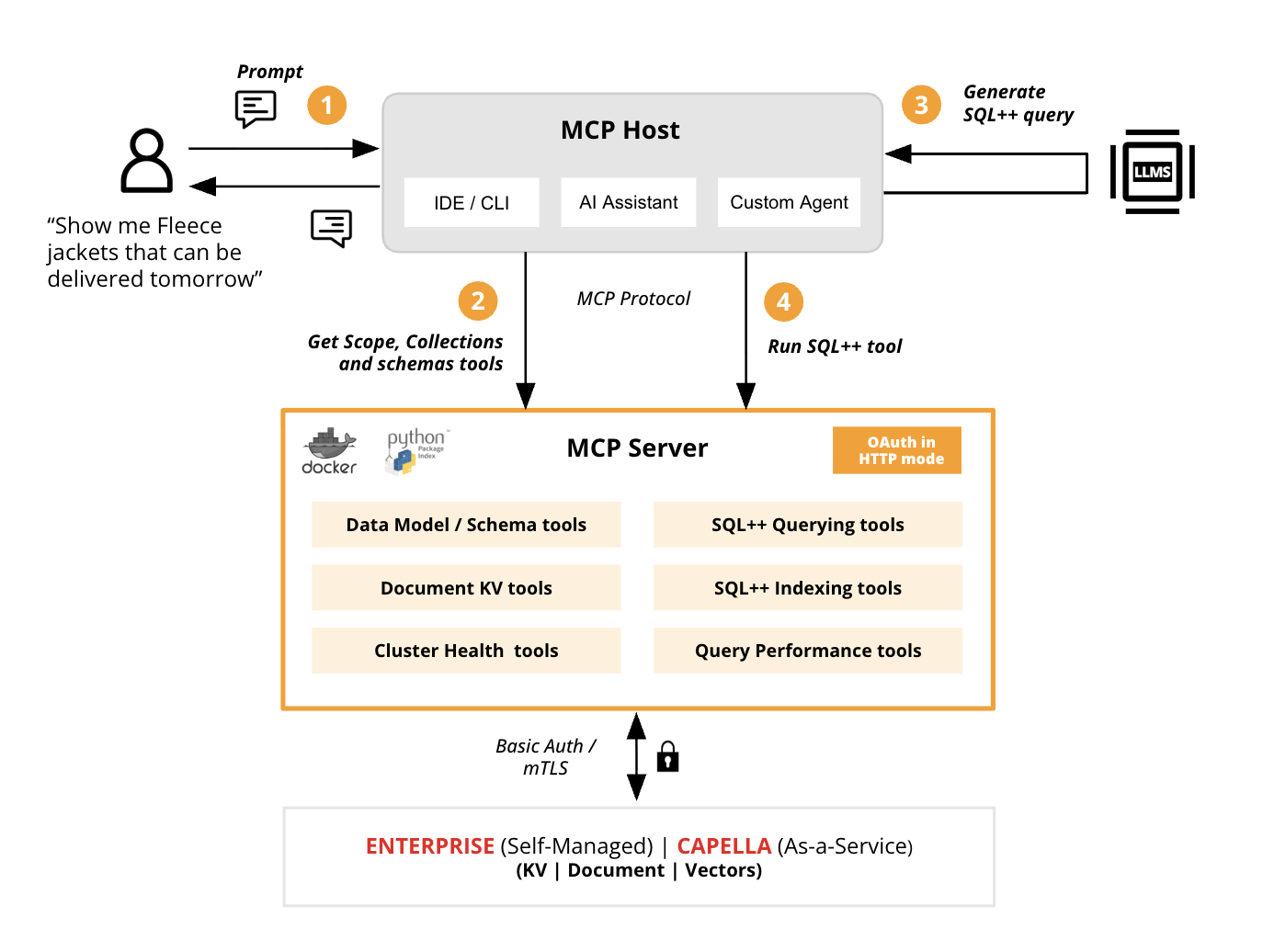
How It Works — A Quick Example
The following example illustrates a typical request. A shopper using a retailer's shop bot asks: "Show me fleece jackets that can be delivered tomorrow." The retailer's inventory lives in Couchbase, and the Couchbase MCP Server is already configured so the shop bot can query that data — with the correct MCP access and the appropriate tools exposed by the server.
- On receiving the prompt, the shop bot first determines where to look. Because it is integrated with the Couchbase MCP Server, it knows the data resides there.
- It calls the schema tools first — retrieving the scopes, collections, and schemas — to discover which collection holds the jacket inventory. Rather than guessing field names, it reads the real structure of the data.
- With the real collections and fields known, it generates a SQL++ query grounded in that schema — here, fetching the jacket documents filtered by one-day delivery.
- It then makes a second tool call to run the SQL++ query. The Couchbase MCP Server executes it, fetches the relevant documents, and returns them to the shop bot over the MCP protocol.
Finally, the shop bot's LLM shapes the result into a natural-language answer for the shopper. Notably, the model never touches the database directly — every data access goes through the MCP server.
Components & Responsibilities
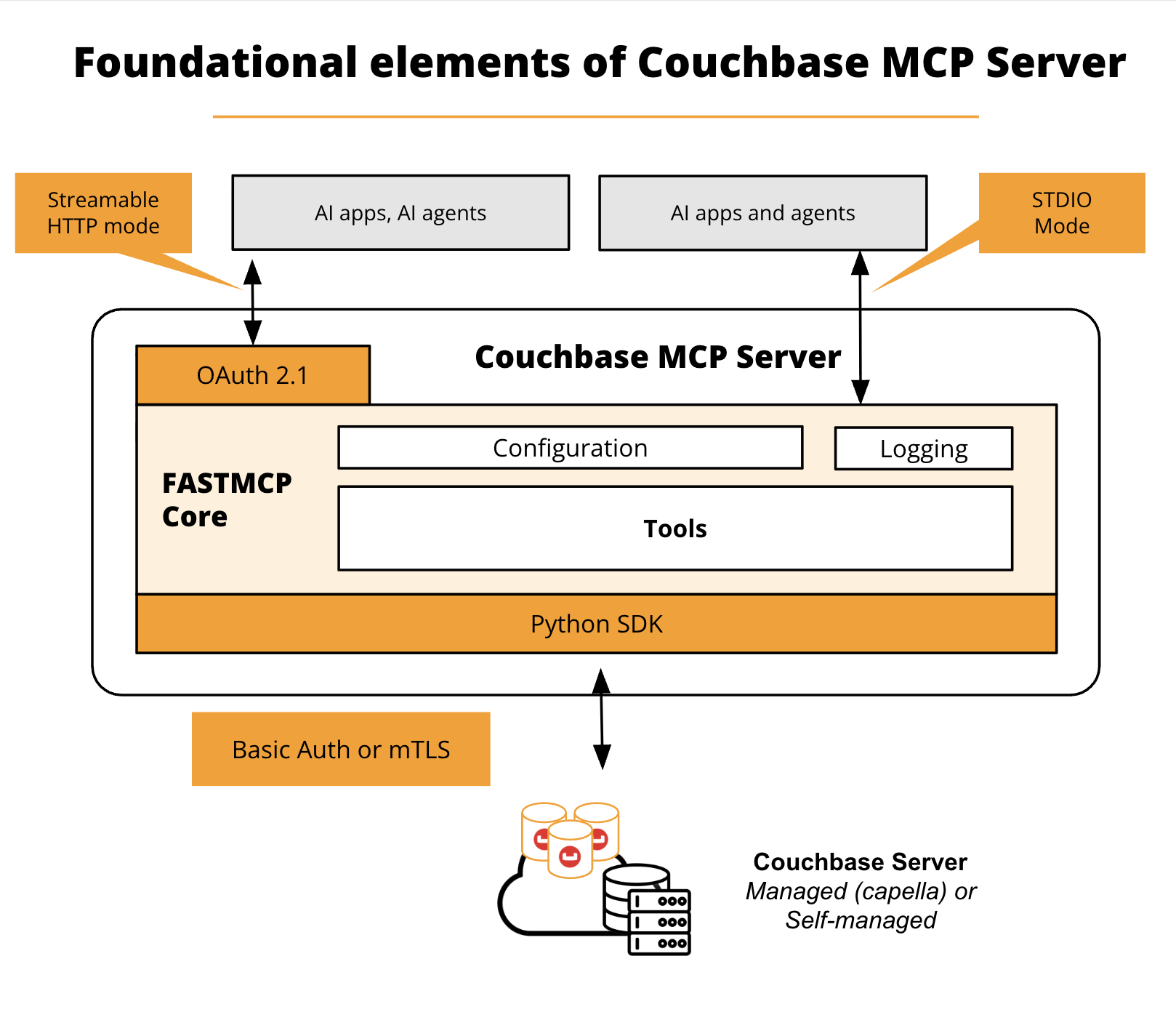
The diagram below shows how these components fit together; the table that follows describes each one.
| Component | Responsibility | Learn more |
|---|---|---|
| MCP Client | The AI agent or IDE (VS Code, Claude Desktop, Cursor, …) that discovers and invokes tools. | Quick Start |
| Transport | How the client reaches the server: stdio (local subprocess) or Streamable HTTP (networked, serves /mcp). | Streamable HTTP |
| MCP Server | The server process (distributed via PyPI and Docker, built on the FastMCP SDK). Hosts the tools and enforces auth and safety controls. | Overview |
| Tool layer | The tools the server exposes — Cluster Health, Schema Discovery, Key-Value, Query & Indexing, and Performance — split into read and write tools. | Tools |
| Safety controls | Server-side gating of which tools load and run: read-only mode, disabled tools, and confirmation/elicitation. | Read-Only Mode · Security |
| OAuth resource server | On Streamable HTTP, verifies client JWTs (signature via JWKS, plus iss/aud/scopes) and optionally publishes PRM for discovery/DCR. | OAuth |
| Couchbase Python SDK | The client library the server uses to perform KV operations and SQL++/Query against the cluster. | — |
| Couchbase Cluster | Capella or self-managed Couchbase. RBAC on the server's credentials is the authoritative data-access control. | Security |
| Identity Provider / Authorization Server | External service that authenticates users/agents and issues signed JWTs (exposes JWKS and issuer). | OAuth |
| Reverse proxy / TLS | For networked deployments, terminates TLS in front of the server so traffic and tokens are encrypted in transit. | Securing the Endpoint with TLS |
| Logging / observability | Structured logs with configurable level and sinks (stderr / file). | Logging |
Authentication Planes
The server has two independent authentication planes:
- Client → Server — secured with OAuth (Streamable HTTP only); decides which client may connect and which tools it may call.
- Server → Cluster — uses your cluster credentials (Basic Auth or mTLS); decides what data the server can actually touch.
They are enforced separately, and cluster RBAC is the ultimate authority over data access. For details, see OAuth and Security.