OAuth Authentication
OAuth is only available in Streamable HTTP transport mode. It has no effect in stdio mode.
When the server is exposed over Streamable HTTP, any client that can reach the endpoint can call its tools. OAuth secures this MCP client → MCP server connection: the server acts as an OAuth 2.1 Resource Server, verifying the JWT access token presented by each client and enforcing scope-based authorization on tool calls.
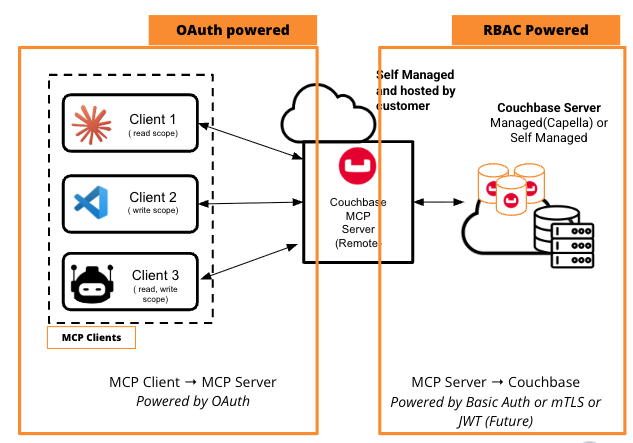
This is independent of the MCP server → Couchbase cluster authentication (Basic Auth / mTLS), which continues to use your cluster credentials. The two layers work together:
- OAuth (client → server) — decides which client/agent may connect and which tools it may call.
- Cluster RBAC (server → cluster) — the authoritative control that decides what data can actually be read or written.
OAuth is initialized only when the CB_MCP_OAUTH_* settings are configured and the transport is set to http. If none of the OAuth settings are provided, the server starts without OAuth and the endpoint is unauthenticated.
Over plain HTTP, OAuth bearer tokens in the Authorization header travel unencrypted and can be intercepted. Run the server behind a reverse proxy that terminates TLS — see Securing the Endpoint with TLS.
In This Section
- Choosing a Setup — pick the right transport and OAuth mode (stdio/streamable-http, M2M, non-DCR, DCR) for who connects.
- Token Verification & PRM — configure JWT validation and, optionally, Protected Resource Metadata for discovery/DCR.
- IDP Compatibility — which identity providers work with the server's scopes.
Definitions & Abbreviations — new to OAuth? Expand for the key terms used throughout this section.
Roles
- Resource Owner — The end user who owns the protected data and grants access permissions.
- Client — The third-party application requesting access to act on the resource owner's behalf.
- Authorization Server (AS) — The server that authenticates the user, secures consent, and issues access tokens.
- Resource Server — The server that hosts the user's protected data or APIs and validates the client's access token. (The Couchbase MCP Server acts as a Resource Server.)
- Identity Provider (IdP) — The service that authenticates users and asserts their identity. Often combined with the Authorization Server in one product (Auth0, Okta, Keycloak), but conceptually distinct — the IdP handles who you are, the AS handles what you can do.
Discovery & Registration
- DCR (Dynamic Client Registration) — An OAuth extension (RFC 7591) that lets clients register themselves with an authorization server programmatically and receive a
client_id(and optionallyclient_secret) without manual setup in the AS admin console. - PRM (Protected Resource Metadata) — A discovery document (RFC 9728) published by the resource server under
/.well-known/oauth-protected-resource, with the protected resource's path appended (for this server,/.well-known/oauth-protected-resource/mcp), that tells clients which authorization servers it trusts, what scopes it supports, and how to authenticate — enabling automatic OAuth discovery.
Tokens & Claims
- JWKS (JSON Web Key Set) — A JSON document (RFC 7517) published by the authorization server containing the public keys clients and resource servers use to verify JWT signatures. Typically served at
/.well-known/jwks.json. - Claims — Key-value statements inside a JWT payload that convey information about the token and its subject — standard claims (
iss,sub,aud,exp,scope) and custom claims (tenant_id,roles, etc.). - Scope — A space-separated string of permission identifiers in an access token that defines what actions the client is authorized to perform on the resource server (e.g.
couchbase-mcp:read). - Audience (
audclaim) — The intended recipient of a token — the resource server identifier the token is meant for. Prevents token replay across services. - Issuer (
issclaim) — The authorization server that minted the token — the trust anchor for verification.
Scopes & Authorization
The server recognizes two scopes that gate tool execution:
couchbase-mcp:read— allows read-only tool execution.couchbase-mcp:write— allows write / mutation tool execution.
The scope can be supplied in either the scope or scp claim, as a space-separated string or an array. These two scope strings are fixed — the server does not support custom or renamed scopes. Whether your identity provider can issue them verbatim depends on the provider; if it can't, map your provider's scopes to these values on the IdP side — see IDP Compatibility.
| Token Scope | Read tools | Write tools | run_sql_plus_plus_query |
|---|---|---|---|
couchbase-mcp:read | ✅ Allowed | ❌ Denied | ✅ Read-only queries only (write statements denied) |
couchbase-mcp:write | ❌ Denied | ✅ Allowed | ❌ Denied |
couchbase-mcp:read couchbase-mcp:write | ✅ Allowed | ✅ Allowed | ✅ Both read and write queries |
Three Authorization Gates
Even with OAuth, a tool call must clear all three of the following. The effective permission is their intersection:
- Token scope — what the JWT is allowed to request (above).
- Server tool configuration — tools removed via Read-Only Mode or Disabling Tools are not instantiated and cannot be called, even if the scope would permit them.
- Cluster RBAC — the credentials the server uses to connect to Couchbase. This is the ultimate, authoritative gate: if the database user lacks permission for an operation, no token can make it happen.
See Tools for the full list of read and write tools.
Request Lifecycle
A tool call on the networked Streamable HTTP + OAuth path flows through these stages:
- The MCP client sends the tool call over HTTP with an
Authorization: Bearer <JWT>header. - The MCP server verifies the JWT — signature (via the IdP's JWKS),
iss,aud, andexp/nbf/iat. Invalid token → 401 Unauthorized. - The server checks the token's scope against the scope required by the tool. Missing scope → 403 Forbidden.
- The server checks whether the tool is enabled — it must not be removed by read-only mode or disabled-tools, and may require user confirmation (elicitation).
- The server executes the operation through the Couchbase Python SDK.
- The cluster enforces RBAC on the server's credentials — if the database user lacks permission, the operation is rejected regardless of token scope.
- The result flows back to the client.
Together, steps 3, 4, and 6 form the three authorization gates — token scope ∩ server tool configuration ∩ cluster RBAC — described in the Three Authorization Gates section above.
On the stdio transport the same flow applies without steps 1–3 (no network exposure, no OAuth): the client launches the server locally and the server authenticates to the cluster with its configured credentials.