Choosing a Setup
This guide helps you pick the right transport and authentication mode for the Couchbase MCP Server. There are two transports (stdio and Streamable HTTP); on HTTP, authentication should always be OAuth, in one of three forms (M2M, non-DCR, or DCR). The right choice depends on who connects, whether a human is in the loop, whether it's networked, and what your identity provider supports.
Quick Decision Guide
-
Is the server used only by you, on your own machine? → Use stdio (no OAuth). Simplest, no network exposure.
-
Is the server shared across people, agents, or machines (i.e. reachable over a network)? → Use Streamable HTTP with OAuth (always — running HTTP without OAuth is not recommended).
- Consumers are headless agents/services (no human login)? → M2M (client credentials).
- Consumers are people using IDE/agent clients (VS Code, Claude Desktop, Cursor, …)?
- Your IdP supports DCR and you have many/varied clients? → DCR.
- Your IdP doesn't support DCR, or you want to control exactly which clients exist? → Non-DCR (manual / pre-registered clients). Note the client limitation below.
Pure localhost can run over plain HTTP; anything reachable by hostname/IP must sit behind a reverse proxy that terminates TLS, so tokens aren't sent in clear text. See Securing the Endpoint with TLS.
The Setups in Detail
1. stdio (local, single user, no OAuth)
The MCP client launches the server as a local subprocess and talks to it over standard input/output. Authentication to the cluster is Basic Auth (or mTLS); there is no client-to-server auth because nothing is exposed on the network.
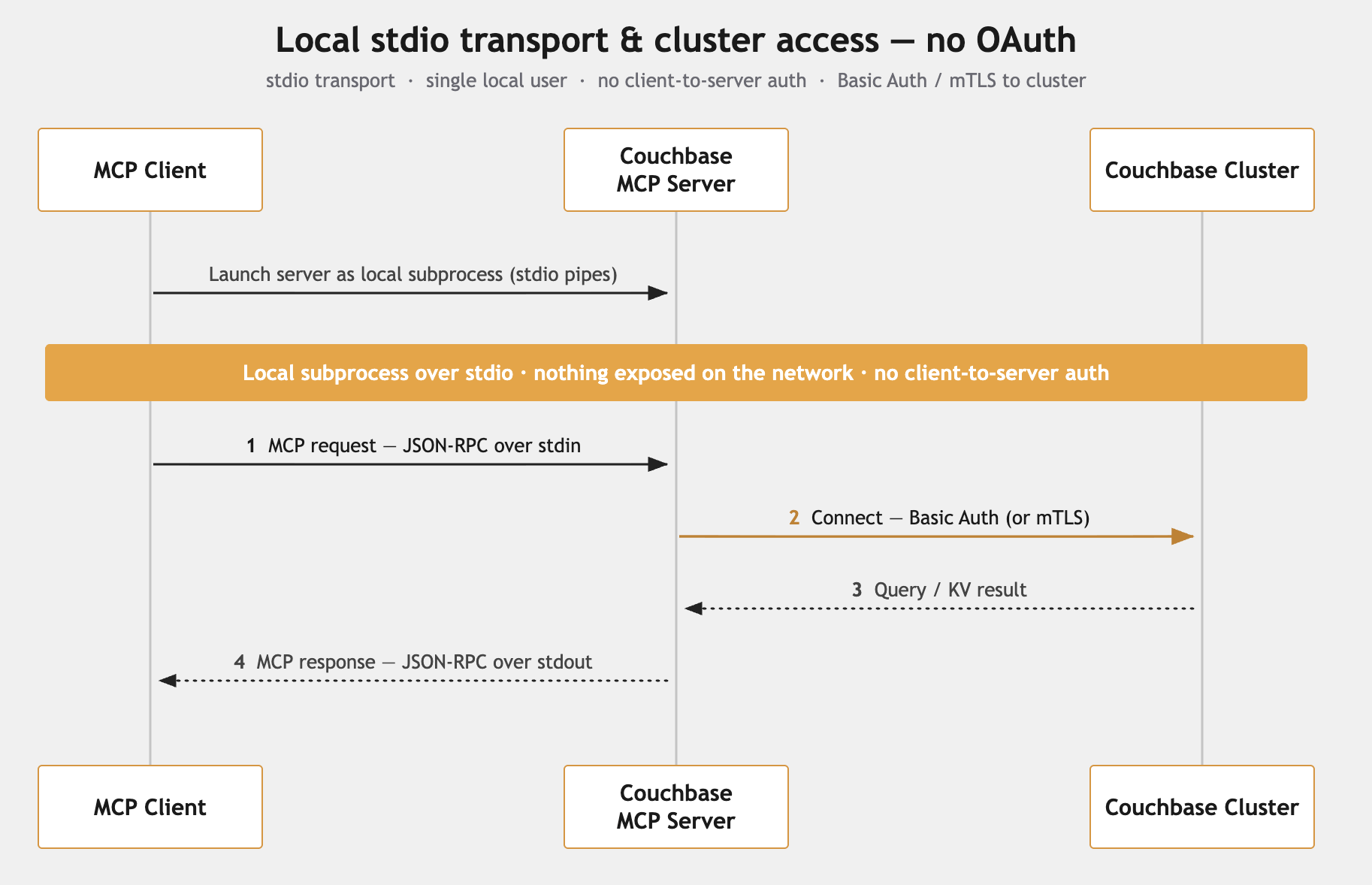
- Use when: local development, a single developer, quick prototyping, notebook-style use.
- Avoid when: the server must be shared by a team, reached over a network, or run as a long-lived service. stdio spawns a process per user, has no transport-level authentication or central auditing, and can have its message stream corrupted by stray output — so it's not a production posture.
- Requirements: none beyond cluster credentials.
It's technically possible to run the server over HTTP with no client authentication, but we do not recommend it: anyone who can reach the endpoint gets full use of the server's cluster credentials. If you expose the server over HTTP, enable OAuth (modes 2–4 below). The only defensible no-auth case is a throwaway localhost test — and even then, prefer enabling OAuth.
2. Streamable HTTP + OAuth — Machine-to-Machine (client credentials)
The server is a pure OAuth resource server: it validates incoming JWTs (signature via JWKS, plus iss, aud, and scopes) but does not issue tokens. In M2M, an agent or service authenticates to your IdP with its own client_id + client_secret and gets a scoped JWT directly. No user, no browser, no consent. No PRM is needed — the client already knows where to get its token.
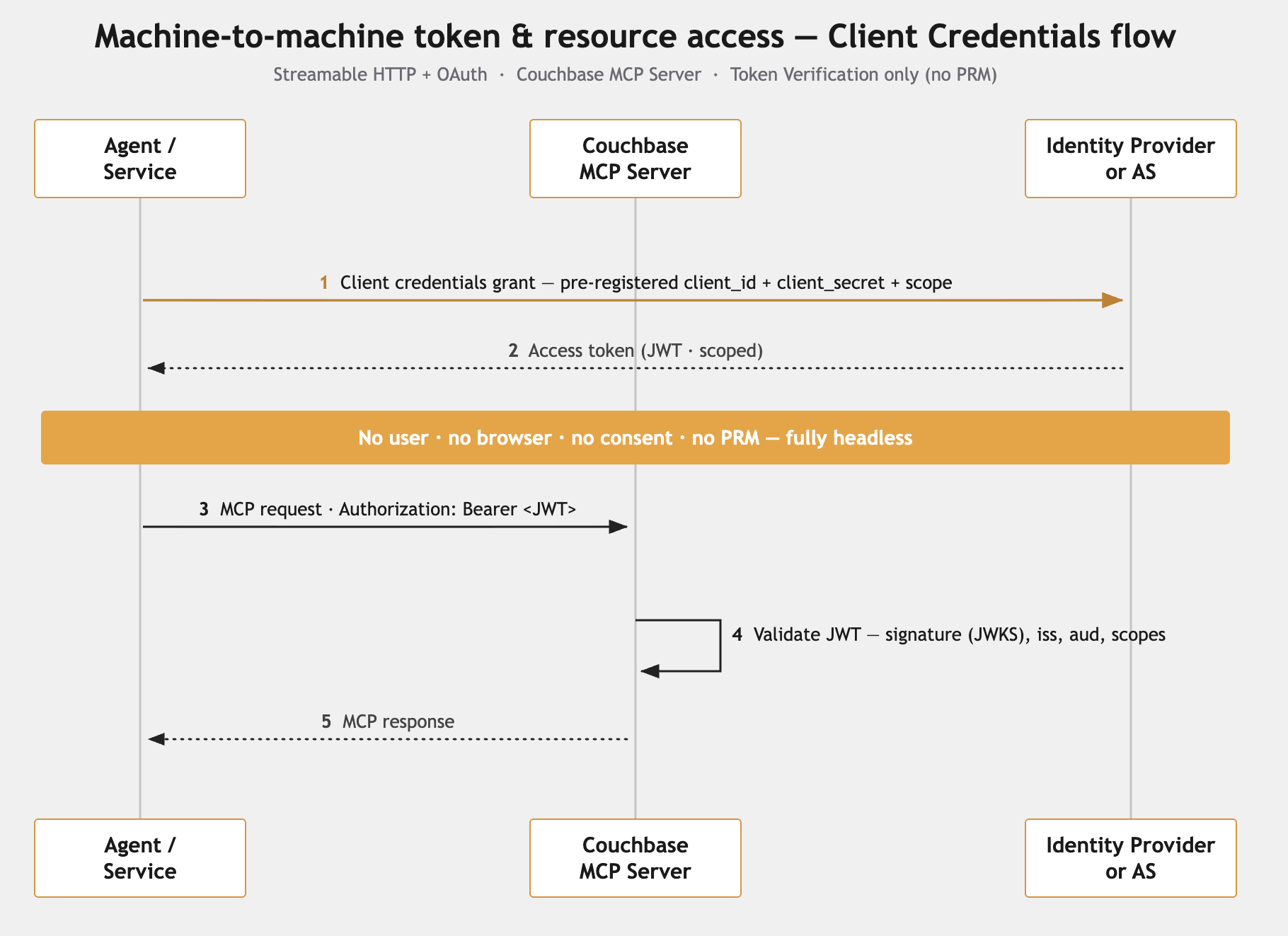
- Use when: backend agents, service-to-service calls, CI jobs, headless automation — any caller that runs without a human and whose credentials you can provision.
- Avoid when: the consumer is an interactive IDE/agent client (those don't use client credentials).
- Requirements: an IdP that issues JWT access tokens for a custom API/audience; one M2M app (and credentials) per agent, granted the read and/or write scope; TLS if networked.
- Good for: the simplest, most controllable setup; easiest to test.
- Couchbase MCP Server setup: Token Verification only — no PRM needed; the client obtains its token directly from the IdP.
3. Streamable HTTP + OAuth — Non-DCR (manual / pre-registered clients, user flow)
Also a resource-server setup, but for interactive users. You pre-register each client in your IdP, obtain a client_id/secret, and the client runs the authorization-code + PKCE flow — a real user logs in and consents.
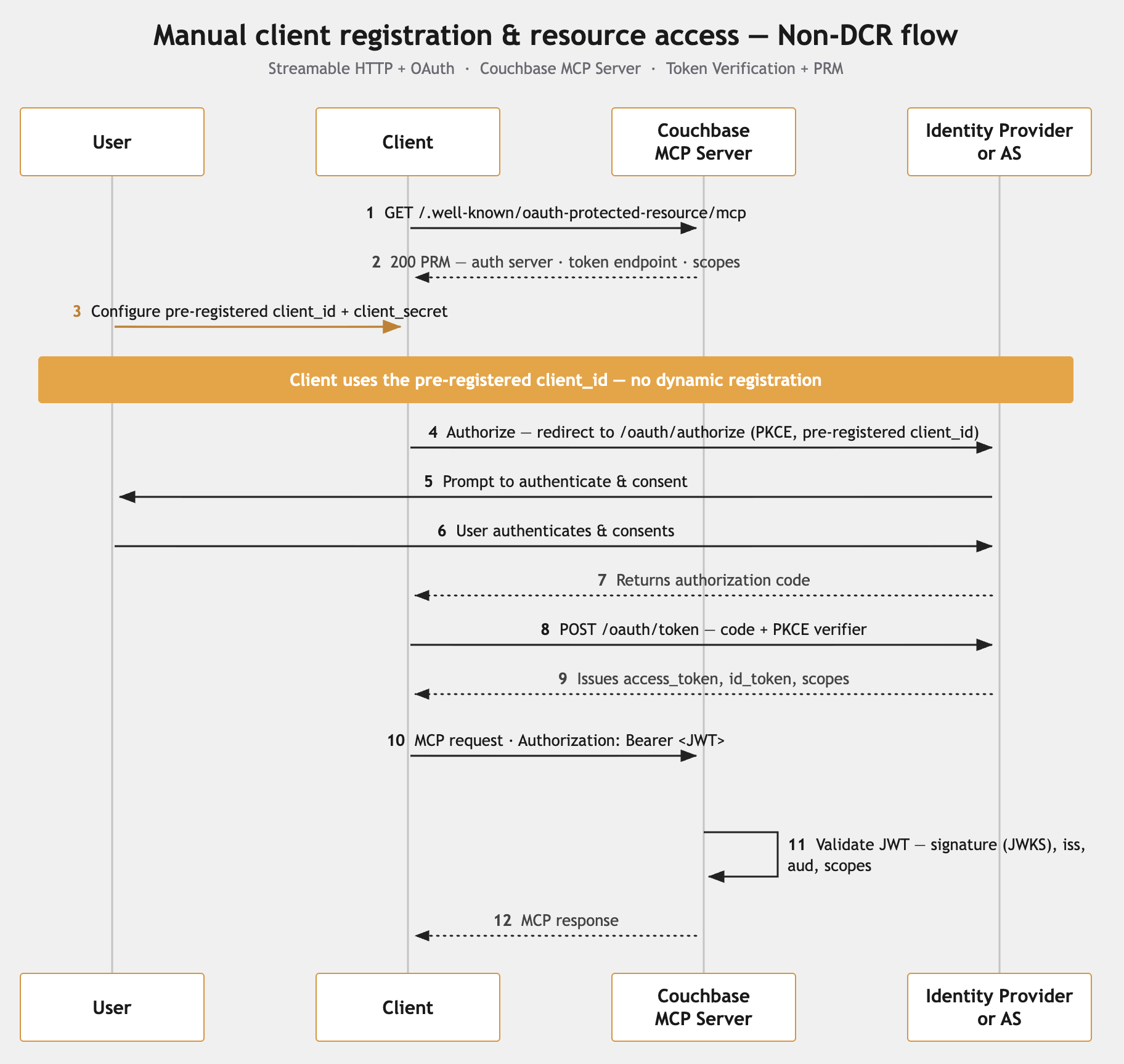
- Use when: your IdP doesn't support DCR; or governance requires that every client be explicitly registered and approved (common in enterprises); or you're driving it from a custom client you control.
- Avoid / caveat: among IDE/agent clients, only VS Code supports manual client-id/secret configuration. Claude Desktop, Cursor, Windsurf, and JetBrains are DCR-only — they can't be driven through manual registration without a custom client-side OAuth proxy. So this mode is practical for VS Code or custom clients, not the broader agent ecosystem.
- PRM is effectively required here for IDE clients. Although the protocol treats PRM as optional, an IDE client has no other way to discover the authorization server, token endpoint, and scopes — so VS Code's manual client-id/secret path still relies on PRM to learn those details (it just supplies a pre-registered client instead of self-registering). PRM is only truly optional for a custom client where you're willing to hard-code all the authorization-server metadata yourself. In short: enable PRM (
--oauth-mcp-base-url) for this mode unless every client is a custom one you configure by hand. - Requirements: an IdP with manual app registration + JWT issuance; PRM enabled (for IDE clients); a logged-in user; TLS if networked.
- Couchbase MCP Server setup: Token Verification + PRM — enable PRM (
--oauth-mcp-base-url) so IDE clients can discover the authorization server.
4. Streamable HTTP + OAuth — DCR (Dynamic Client Registration)
The server publishes Protected Resource Metadata (PRM), so clients discover your IdP and register themselves automatically, then run the authorization-code + PKCE flow with user login and consent. No per-client manual setup.
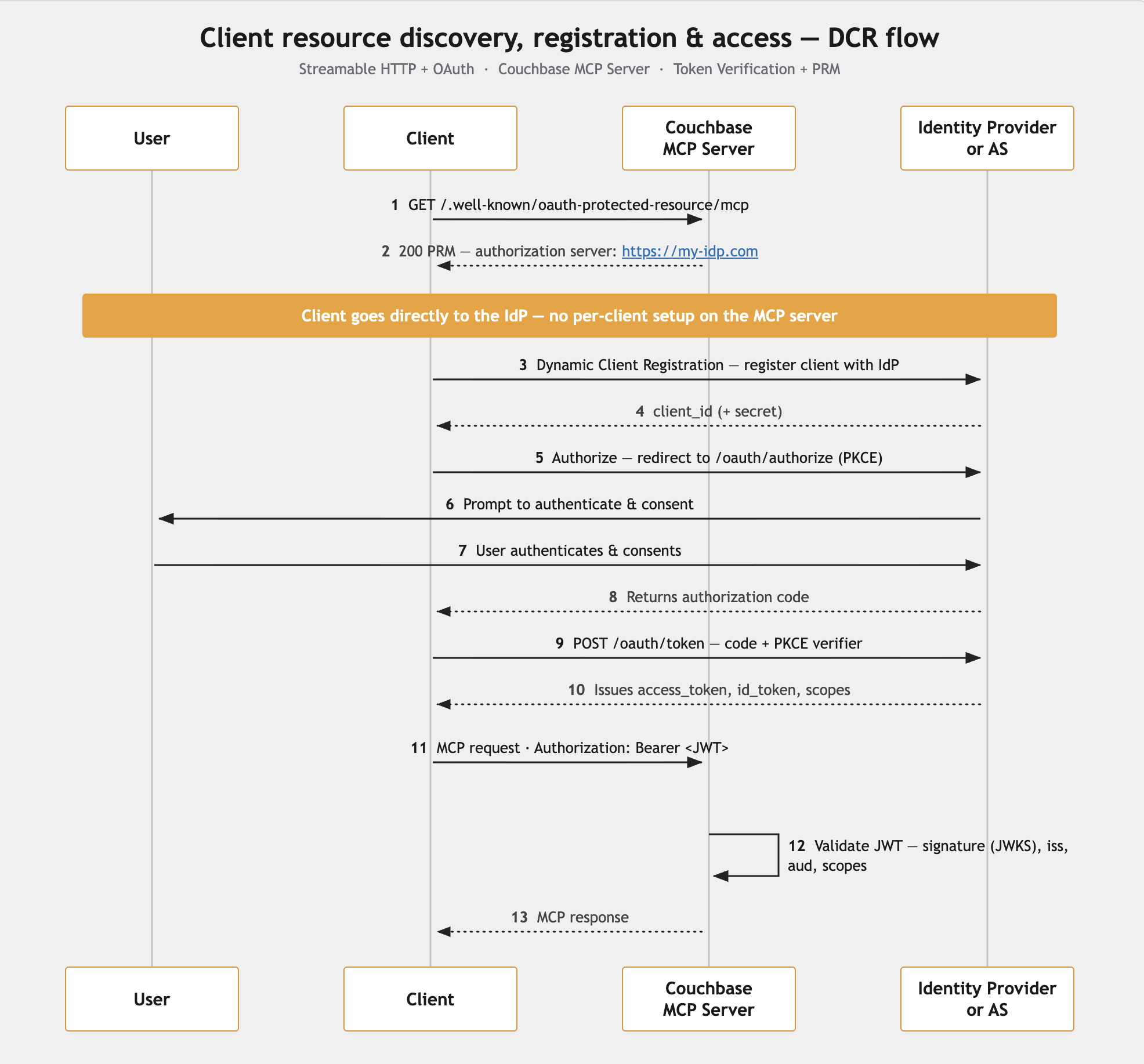
- Use when: many or varied interactive clients need access (VS Code, Claude Desktop, Cursor, etc.), and registering each one by hand doesn't scale; and your IdP supports DCR.
- Avoid when: your IdP can't do DCR — you'd need a DCR-capable proxy in front, or fall back to non-DCR / M2M.
- Requirements: an IdP with DCR enabled; the server started with its public base URL so it publishes PRM; TLS if networked.
- Good for: broadest client compatibility with the least per-client friction.
- Couchbase MCP Server setup: Token Verification + PRM — PRM (
--oauth-mcp-base-url) is required so clients can discover and self-register.
Comparison at a Glance
| Setup | Use when | Human in loop? | Client compatibility | Server setup | PRM |
|---|---|---|---|---|---|
| stdio | Local, single user, dev | Optional | The local client only | n/a (no OAuth) | n/a |
| HTTP + OAuth, M2M | Headless agents / services | No | Custom / service clients | Token Verification | Not needed |
| HTTP + OAuth, non-DCR | IdP without DCR, or strict client control | Yes | VS Code or custom only (other IDEs are DCR-only) | Token Verification + PRM | Effectively required for IDE clients |
| HTTP + OAuth, DCR | Many/varied interactive clients; IdP supports DCR | Yes | VS Code, Claude Desktop, Cursor, … | Token Verification + PRM | Required |
Running Streamable HTTP without OAuth is omitted here on purpose — it is not a recommended deployment. Use one of the OAuth modes whenever the server is exposed over HTTP.
Cross-Cutting Notes
-
Three independent authorization gates. Even with OAuth, a tool call must clear the JWT scope, the server's tool configuration (read-only mode / disabled tools), and the cluster RBAC. Cluster RBAC is the ultimate gate. See Scopes & Authorization.
-
Scope strings depend on your IdP. The built-in scopes are
couchbase-mcp:readandcouchbase-mcp:write. Some IdPs issue them verbatim; others impose a scope format or issue opaque tokens. See IDP Compatibility. -
TLS. Localhost-only testing can use plain HTTP. The moment the server is reachable beyond localhost — a teammate, another host, a tunnel — put it behind a reverse proxy that terminates TLS. See Securing the Endpoint with TLS.
-
Picking between M2M, non-DCR, and DCR in one line. Machines with no user → M2M; interactive users whose IdP lacks DCR (or where only VS Code is in play) → non-DCR; interactive users across many client apps with a DCR-capable IdP → DCR.
Next Steps
- Token Verification & PRM — configure the server for your chosen mode.
- IDP Compatibility — confirm your identity provider works.